
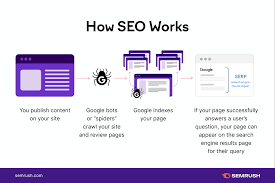
SEO Optimisation for Google: A Practical Guide
SEO optimisation for Google helps your website appear when people search for products, services or information related to your business. Effective search engine optimisation is not about tricking Google or repeating keywords as often as possible. It is about making useful, trustworthy content easy for people and search engines to find and understand.
Whether you run an online shop, publish a blog or provide local services, a clear SEO strategy can help attract relevant visitors over time. Here are the key areas to focus on.
Understand what your audience is searching for
Start by learning the words and questions potential customers use when looking for what you offer. These are your keywords and search topics. Consider the specific problems your products or services solve, and look at the language your customers use in enquiries, reviews and conversations.
Choose a main topic for each important page. Related phrases can appear naturally in the copy, headings and page title, but avoid forcing them into every sentence. A page should be written for people first, with clear and accurate information that genuinely answers their needs.
Create helpful, high-quality content
Google aims to show results that are useful and relevant to the search. Make your content original, clear and detailed enough to help readers take their next step. Explain specialist terms, use examples where appropriate, and keep important information up to date.
Before publishing, ask whether the page offers something valuable beyond a list of keywords. Does it answer the reader’s question? Is it easy to follow? Does it accurately describe your products, services or expertise? These checks can help improve both the visitor experience and the quality of your site.
Optimise page titles and headings
Each page should have a descriptive title that tells people what it is about. Keep it concise and distinctive, and include the main topic where it fits naturally. A clear title can help users decide whether your page is relevant to their search.
Use headings to organise the content into logical sections. The main heading should describe the page, while subheadings help readers scan the details. A sensible heading structure makes content easier to read and understand.
Make your website easy to use
A useful website should work well on mobile devices, load reliably and be straightforward to navigate. Make important pages easy to reach, use descriptive links and ensure text is readable. Compressing large images and removing unnecessary scripts may also help improve page performance.
Technical SEO is the work that helps search engines access and understand your site. This can include fixing broken links, using secure HTTPS, creating a sitemap and checking that important pages are not accidentally blocked from indexing. Google Search Console can help identify some crawling and indexing issues.
Use clear URLs, images and internal links
Simple, readable URLs make it easier for people to understand where a link leads. Use descriptive file names and alternative text for images where they help explain the image’s purpose. Alternative text should describe the image accurately, rather than being used to add extra keywords.
Internal links connect related pages on your website. For example, a guide could link to a relevant product or service page. Use link text that clearly explains what visitors will find when they follow it.
Build trust and demonstrate expertise
Show visitors who is responsible for your website and how they can contact you. Depending on your business, useful trust signals may include an About page, clear policies, accurate product information, customer support details and evidence of relevant experience.
Links from other reputable websites can also help people discover your content and provide useful context about your site. Focus on earning links by publishing worthwhile resources and building genuine relationships. Avoid buying large quantities of low-quality links or using schemes designed to manipulate search rankings.
Measure results and keep improving
SEO takes time, and rankings can change. Use tools such as Google Search Console to see which searches bring people to your site and to monitor indexing or technical problems. Website analytics can help you understand what visitors do after they arrive.
Review performance regularly, but look beyond rankings alone. Relevant visits, enquiries, sales and engagement can give a fuller picture of whether your SEO work is meeting its goals. Update pages when information changes, and improve content when it no longer answers readers’ needs.
SEO optimisation for Google is a long-term process
The foundations of effective Google SEO are straightforward: understand your audience, create useful content, make your website technically sound and build trust. There is no guaranteed shortcut to top rankings. Consistent improvements, guided by real user needs and reliable data, give your website a stronger chance of being found by the right people.
7 Essential Tips for Optimising Your Website for Google SEO
- Research keywords your audience actually uses.
- Write clear, unique titles and meta descriptions.
- Create helpful, original content for readers.
- Use descriptive headings and natural keywords.
- Make pages fast and mobile-friendly.
- Add useful internal links and descriptive anchor text.
- Submit an XML sitemap in Google Search Console.
Research keywords your audience actually uses.
Research the keywords your audience actually uses by thinking about the questions they ask, the problems they want to solve and the words they use to describe your products or services. Look at customer enquiries, reviews and discussions, and use keyword research tools to discover related search terms and their popularity. Choose phrases that match the purpose of each page, then include them naturally in your content, headings and page titles. This helps Google understand what your page is about while keeping it useful and easy to read for visitors.
Write clear, unique titles and meta descriptions.
Write a clear, unique title and meta description for every important page on your website. The title should accurately summarise the page and include its main topic naturally, while the meta description should give searchers a concise, appealing reason to visit. Avoid duplicate wording, keyword stuffing and promises the page does not fulfil. Google may choose to display different text in search results, but well-written titles and descriptions can help people understand what your page offers and decide whether it is relevant.
Create helpful, original content for readers.
Create helpful, original content that puts readers’ needs first. Answer their questions clearly, offer accurate and useful information, and add your own knowledge or perspective rather than repeating what is already available elsewhere. Use relevant search terms naturally, but avoid writing simply to include keywords. Content that genuinely helps visitors is more likely to earn their trust and encourage them to return.
Use descriptive headings and natural keywords.
Use descriptive headings to organise your content and show readers what each section covers. Include relevant keywords naturally where they fit, but avoid forcing them into headings or repeating them unnecessarily. Clear, helpful headings make pages easier to scan and help Google understand how the content relates to people’s searches.
Make pages fast and mobile-friendly.
Make sure your pages load quickly and work smoothly on mobile devices, where many people browse and search. Compress large images, remove unnecessary scripts and use a responsive design so content adapts to different screen sizes. Fast, mobile-friendly pages are easier to use and can help visitors find what they need without frustration.
Add useful internal links and descriptive anchor text.
Add useful internal links to guide visitors to related pages and help them discover more of your content. Use descriptive anchor text that clearly explains what the linked page is about, rather than vague phrases such as “click here”. For example, link the words “RC car maintenance guide” to a relevant guide on your site. Clear, relevant links make your website easier to navigate and help Google understand how its pages are connected.
Submit an XML sitemap in Google Search Console.
Submitting an XML sitemap in Google Search Console helps Google discover and understand the important pages on your website. A sitemap is a file that lists URLs you want search engines to find, making it especially useful for new or frequently updated sites. Add the sitemap’s URL in the “Sitemaps” section of Search Console, then check for any errors or pages Google could not process. A sitemap can support crawling, but it does not guarantee that every listed page will be indexed.