
Play Store Keyword Search Volume: What It Means and How to Use It
For app developers and marketers, understanding Play Store keyword search volume can help guide app store optimisation (ASO). It offers an indication of how often people search for a particular term in Google Play, helping you assess potential demand and choose relevant keywords for your app’s title, short description and full description.
However, search volume is only one part of the picture. A popular keyword may be highly competitive or may attract people who are unlikely to install your app. The most useful keyword strategy balances estimated demand with relevance, competition and actual app performance.
What is Play Store keyword search volume?
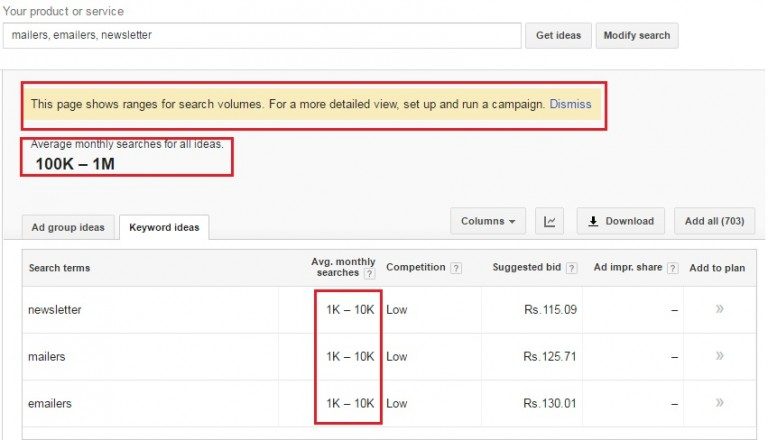
Keyword search volume is an estimate of the number of searches made for a specific phrase over a given period. For example, someone promoting a budgeting app might research terms such as “budget planner”, “expense tracker” or “monthly budget”. Search volume can help compare the potential audience for these phrases.
Google does not provide a simple, public figure showing the exact number of Google Play searches for every keyword. As a result, figures from ASO platforms should generally be treated as estimates, rather than precise counts. Different tools may use different data sources and calculation methods, so their numbers can vary.
Why search volume matters for ASO
Keywords influence how people discover apps through store search. Researching them can help you:
- Find phrases that potential users are likely to search for.
- Identify relevant terms that may be less competitive.
- Improve the wording of your store listing.
- Generate ideas for new features, content or app positioning.
- Measure whether changes to your listing improve discovery and installs.
Search volume should not be treated as a guarantee of visibility or downloads. A keyword with high estimated demand may be difficult to rank for, while a more specific phrase with lower demand may bring visitors who are a better fit for your app.
Where to find keyword data
Google Play Console
Google Play Console provides performance data for your app, including information about how people find and interact with your store listing. Depending on the reports and data available for your app, you may be able to review search-related traffic and performance. This can help you understand which discovery channels are contributing to visitors and installs.
These reports are useful for evaluating your own listing, but they are not a complete public database of search volumes for every Play Store keyword. Data availability and reporting detail can also vary.
ASO research tools
Specialist ASO platforms offer keyword suggestions, estimated search popularity, competition indicators and tracking for selected terms. They can be useful for building a research list and comparing opportunities, but their scores are not official Google Play search counts. Use them to identify patterns and test ideas, rather than relying on a single number.
Search results and customer language
Manual research can add useful context to tool data. Search Google Play for relevant phrases and review the apps that appear. Note how competing listings describe their products, what features they emphasise and whether the results match the intent behind the search. User reviews, support enquiries and customer feedback can also reveal the words people naturally use to describe their needs.
How to research Play Store keywords
- Start with your app. List its core purpose, main features, audience and the problems it solves.
- Brainstorm search phrases. Include broad terms, feature-specific phrases and wording used by your target audience.
- Check relevance. Ask whether someone searching each phrase would reasonably expect to find your app. Remove misleading or unrelated terms.
- Compare estimates and competition. Use ASO tools to identify possible demand and assess how established competing apps are. Treat the results as directional.
- Look for specific opportunities. Longer, more descriptive phrases may have less estimated volume, but can reflect clearer user intent.
- Prioritise a focused set. Choose a manageable group of closely related terms rather than trying to target every possible phrase.
- Review performance over time. Monitor listing visitors, installs and conversion rates, and compare results after making changes.
Volume is not the same as opportunity
A useful keyword is not necessarily the one with the largest search-volume estimate. Consider three factors together:
- Relevance: Does the term accurately describe the app and its features?
- Demand: Is there evidence that users search for this kind of solution?
- Competition: Are the search results dominated by apps with strong brands, ratings and established visibility?
It is also important to consider intent. A broad term such as “fitness” could attract many different types of users. A phrase such as “home workout plan” is more specific and may better match an app designed for guided exercise at home.
Using keywords in your store listing
Once you have chosen relevant terms, use them naturally in your listing. Make sure the title and short description explain what the app does, while the full description provides clear detail about its features and benefits. Avoid awkward repetition, keyword stuffing or claims that the app cannot support. A listing should be written for people first and should accurately represent the product.
Store listing fields, policies and search systems can change, so check current Google Play guidance before making significant updates. Localise keyword research as well: people in different countries may use different phrases, even when they are searching for the same type of app.
Measure results, not just rankings
Keyword rankings and search-volume estimates are useful signals, but they do not show the full impact of an ASO change. Track outcomes such as store listing visitors, installs and conversion rate where those metrics are available. If traffic rises but installs do not, the listing may be attracting the wrong audience or failing to explain the app’s value. If performance improves, document what changed and continue testing carefully.
Conclusion
Play Store keyword search volume can help you discover and prioritise search terms, but it is an estimate rather than a complete measure of opportunity. Combine ASO tool data with Google Play Console reporting, competitor research and the language your users actually use. By focusing on relevance, intent and measurable results, you can build a more useful keyword strategy and improve the chances that the right people will discover your app.
Understanding and Optimising Play Store Keyword Search Volume: FAQs
- What is Play Store keyword search volume?
- How can I check the search volume of a keyword on Google Play?
- Does Google Play provide exact keyword search volume data?
- Which tools can estimate Google Play keyword search volume?
- How can I choose keywords with high search volume and low competition?
- How often should I review and update my Play Store keywords?
What is Play Store keyword search volume?
Play Store keyword search volume is an estimate of how often people search for a particular term or phrase on Google Play over a set period. It can help app developers understand potential demand and choose relevant keywords for their store listing. Because Google does not publish exact search counts for every term, figures from ASO tools should be treated as estimates and used alongside relevance, competition and app performance data.
How can I check the search volume of a keyword on Google Play?
To check the search volume of a keyword on Google Play, use an app store optimisation (ASO) tool that provides keyword popularity estimates, as Google Play does not publish exact search counts for every term. Compare estimates across tools, since their data and scoring methods can differ, and treat the figures as a guide rather than a precise measure. You can also review Google Play Console reports to understand how people discover your own app, then test relevant keywords in your listing and monitor changes in visits and installs.
Does Google Play provide exact keyword search volume data?
Google Play does not provide exact search-volume figures for every keyword. Google Play Console offers performance reports that can help you understand how people discover your app, but it is not a public database of precise search counts for individual terms. ASO tools can provide search-volume estimates, though these may differ between platforms and should be treated as indicators rather than exact figures.
Which tools can estimate Google Play keyword search volume?
Tools such as AppTweak, Sensor Tower, MobileAction, App Radar and ASOdesk can provide estimates of Google Play keyword search volume, alongside keyword suggestions and competition data. These figures are modelled estimates rather than exact search counts published by Google, so they can vary between platforms. Use them to compare keywords and spot trends, then assess your own listing’s performance in Google Play Console.
How can I choose keywords with high search volume and low competition?
To find Play Store keywords with high search volume and low competition, start by listing phrases closely related to your app, then compare estimated demand and competition using ASO research tools. Look beyond broad, popular terms: specific phrases and long-tail keywords may attract fewer searches but can be easier to rank for and better match what your ideal users want. Check the apps already appearing for each term, and prioritise keywords that are relevant, achievable and likely to bring engaged users. Treat tool figures as estimates, then monitor your listing’s traffic, installs and conversion rate to see which keywords perform best.
How often should I review and update my Play Store keywords?
Review your Play Store keywords every few months, and whenever you make a significant change to your app, target audience or market. Check performance data regularly for shifts in listing traffic, installs and conversion rates, but avoid changing keywords too often: allow enough time to see the effect of each update. You should also revisit your research when new competitors appear, user search behaviour changes or seasonal demand affects your category.